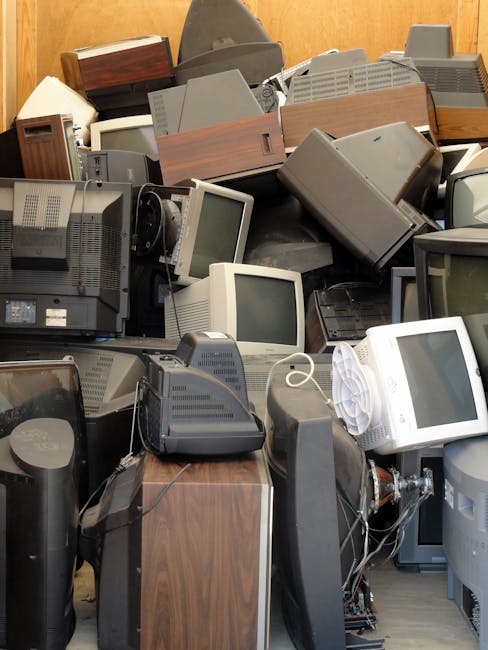
Electronic waste pileup in Brockley: safe drop-off options
Old phones in a kitchen drawer. A broken monitor leaning behind the sofa. That dusty printer you keep meaning to sort out. Before long, the whole thing turns into an electronic waste pileup, and in Brockley that usually means one thing: it's time to clear it safely, not just shift it out of sight. This guide on Electronic waste pileup in Brockley: safe drop-off options explains what counts as e-waste, why safe disposal matters, and how to choose a sensible drop-off route without making a simple job harder than it needs to be.
Truth be told, e-waste has a habit of sneaking up on people. One item becomes three, three becomes a pile, and suddenly you're wondering what can go where. Below you'll find practical steps, common mistakes, comparison points, and a checklist you can actually use. If you need broader help with mixed items too, it can be worth looking at general waste removal options or even recycling and sustainability guidance when you're planning a bigger clear-out.
Table of Contents
- Why safe e-waste drop-off matters in Brockley
- How safe drop-off usually works
- Key benefits and practical advantages
- Who this is for and when it makes sense
- Step-by-step guidance
- Expert tips for better results
- Common mistakes to avoid
- Tools, resources and recommendations
- Law, compliance and best practice
- Options and comparison table
- Case study or real-world example
- Practical checklist
- Conclusion
- Frequently asked questions
Why Electronic waste pileup in Brockley: safe drop-off options Matters
Electronic waste is not just clutter. It often contains batteries, circuit boards, plastics, cables, screens, and small components that need careful handling. When items are dumped in a general bin, left in a hallway, or stacked in a damp shed, they can leak, crack, overheat, or simply become harder to sort later. A small pile can turn into a messy one very quickly, especially if you keep adding "just one more thing".
Safe drop-off options matter because they help separate reusable, repairable, recyclable, and genuinely broken items. That distinction matters for the environment, but it also matters for your home, your landlord, your workplace, and your own peace of mind. Nobody wants a tangle of old chargers and a half-dead laptop battery sitting near the front door for weeks. It is not exactly a design feature.
In a place like Brockley, where many homes and flats are short on storage, a pileup can also become a practical nuisance. It takes up space, gets knocked over, and tends to spread from one corner to another. Once you start dealing with it properly, the whole room feels lighter. A bit less visual noise, a bit less stress.
Expert summary: The safest e-waste approach is simple: keep items dry, separate batteries where possible, and choose a drop-off route that accepts the full type of equipment you have rather than forcing everything into one bag.
How Electronic waste pileup in Brockley: safe drop-off options Works
At a practical level, safe drop-off means you collect your unwanted electronics, check what they are, and send them to a route that can handle them properly. That might involve separating small household electronics from larger appliances, or keeping batteries out of devices if that can be done safely. Not every item needs the same treatment, which is where people often get stuck.
A typical process looks like this:
- Identify the items: phones, laptops, monitors, printers, cables, kettles, tablets, routers, and similar equipment.
- Check whether anything still works or can be reused.
- Remove personal data from devices that store files or account information.
- Keep batteries, chargers, and loose accessories together, but safely packed.
- Choose the most suitable drop-off or collection route.
- Hand items over in a tidy, accessible way so they can be sorted efficiently.
That sounds straightforward, and usually it is. The trouble starts when a pile includes mixed materials. For example, a box of old tech might contain a broken screen, a printer cartridge, a few dead remotes, and a battery pack from who-knows-when. That is still manageable, but it helps to sort it before you head out. A little prep saves a lot of back-and-forth.
If the pile is part of a bigger property clear-out, you may want to combine it with a broader service such as home clearance or, for larger domestic jobs, house clearance. For small flats with limited lift access or tight stairwells, flat clearance can be especially useful because logistics matter just as much as disposal.
Key Benefits and Practical Advantages
Safe e-waste drop-off is not only about staying compliant or "doing the right thing". There are some very real day-to-day benefits too.
- Less clutter: Removing unused devices frees up valuable space in cupboards, under desks, and along hallways.
- Lower safety risk: Damaged cables, swollen batteries, and cracked screens are easier to manage when handled properly.
- Better recycling outcomes: Electronics contain recoverable materials that should not be lost to general waste.
- Less stress: A pile of old tech can feel oddly draining. Clearing it gives an immediate sense of order.
- Data protection: When devices are handled deliberately, you are more likely to wipe or destroy storage media safely.
- Cleaner handover: Sorted items are quicker to process and less likely to be rejected or delayed.
There is also a small but important psychological benefit. Once you deal with e-waste, other jobs seem less intimidating. The drawer full of old cables stops haunting you. Sounds silly, maybe, but you will know exactly what I mean if you have ever opened that drawer at 9 pm and sighed.
Who This Is For and When It Makes Sense
This topic matters to a wide range of people in Brockley. It is not just for business owners or house movers. In fact, most e-waste pileups come from ordinary life: a family upgrade, a broken work laptop, a flat full of inherited gadgets, or a room that slowly became the unofficial storage zone for obsolete tech.
You will likely benefit from safe drop-off options if you are:
- clearing out an office or workstation
- moving home and don't want to transport dead electronics
- dealing with a garage, loft, or spare room build-up
- replacing old household appliances
- managing end-of-term equipment from a rental or flatshare
- sorting business equipment in a small local office
For companies, the concern is often larger. A business might have multiple monitors, keyboards, docking stations, printers, and backup hardware. In those cases, it can help to use a more structured route such as business waste removal or office clearance if the electronics are part of a wider workspace reset.
For domestic jobs, it tends to make sense when the pile is big enough to feel annoying, but not big enough to justify a full renovation-level response. That awkward middle ground. Everyone has one.
Step-by-Step Guidance
If you want to deal with electronic waste pileup in Brockley in a calm, safe way, follow this sequence.
1. Make a quick inventory
List what you have before you move anything. Separate items into rough groups: screens, computers, peripherals, batteries, small appliances, and cables. It takes five minutes, and honestly, that small admin step prevents a lot of confusion later.
2. Check for reuse first
Some devices are old but still functional. A printer that works, a monitor with no dead pixels, or a laptop that only needs a charger may be suitable for reuse or resale. If you are unsure, treat it as waste only after you have checked the basics. Be fair to the item; some gadgets survive far longer than we expect.
3. Protect your data
Before any device leaves your hands, remove memory cards, log out of accounts, and reset phones, tablets, and laptops where possible. If the device stores personal or business information, take extra care. The general rule is simple: if it can remember your data, it can probably keep it unless you deal with it properly.
4. Keep batteries safe
Loose batteries should be handled with caution. Avoid mixing them with metal objects, and do not store damaged batteries in warm or cramped places. If a battery is swollen, leaking, or hot, stop and seek a safer route for handling it. Do not force it into a bag and hope for the best.
5. Pack items neatly
Use sturdy boxes or containers, especially for screens and fragile electronics. Keep cords bundled. Tape over exposed plugs if needed. A clean pile is much easier to move and less likely to break on the way.
6. Choose the right drop-off or collection option
Match the route to the item type and volume. Small household gadgets may suit a drop-off, while larger mixed loads often work better through a scheduled clearance. If the pile is sitting alongside furniture or general household waste, pairing it with furniture clearance or furniture disposal can save time.
7. Hand over items with a final check
Before you leave, make sure you have not forgotten chargers, hard drives, or accessories tucked behind boxes. It happens. More often than people admit.
Expert Tips for Better Results
Here are the small things that make the biggest difference.
- Keep e-waste dry. Damp cardboard and wet electronics create avoidable problems, especially for collection teams.
- Separate screens from heavier items. A monitor crushed under old desktop towers is a bad idea from a handling point of view.
- Bundle cables by type. It sounds dull, but tangled cords are a headache when you are sorting everything later.
- Do one room at a time. Trying to clear the whole property in one go often leads to half-finished piles everywhere.
- Label boxes if there is business data involved. That helps anyone handling the material later.
- Ask about the full load. If you have electronics mixed with loft junk, garage clutter, or old appliances, plan the whole job rather than the gadgets alone.
A small real-world tip: set aside one visible "tech box" in the house for a week before the actual drop-off. Phones, remotes, chargers, and spare batteries often surface from odd places - the top shelf, the back of a drawer, under the bed. You always find one more cable. Always.
Common Mistakes to Avoid
People usually do not make huge mistakes. They make a few small ones that add up.
- Treating e-waste like ordinary rubbish: It may be tempting, but it is the wrong route for most electronics.
- Leaving batteries loose in a box: This increases the chance of damage and makes sorting slower.
- Mixing data-bearing devices with generic scrap: That can create avoidable privacy risk.
- Forgetting chargers and accessories: The main item may leave, but the useful extras get left behind.
- Waiting until the pile becomes unmanageable: Smaller, regular clear-outs are easier than one giant rescue mission.
- Assuming everything is recyclable in the same way: Different devices need different treatment.
Another common issue is underestimating weight and bulk. A bag of cables is not huge, but a stack of monitors or all-in-one printers can be awkward in a stairwell. If you live in a top-floor flat, that matters. A lot.
Tools, Resources and Recommendations
You do not need specialist equipment to get started, but a few simple tools help a lot:
- strong boxes or plastic crates for small electronics
- labels or marker pens for sorting
- zip ties or Velcro straps for cables
- microfibre cloths for wiping dust from items before packing
- packing tape for securing loose lids or plugs
- a small screwdriver set if you need to remove batteries or detachable parts safely
For a larger clear-out, it can be smart to combine e-waste with other household or property categories rather than making separate jobs for everything. For example, a loft that contains old tech, broken decorations, and forgotten boxes may benefit from loft clearance, while a cluttered garage with old tools and appliances might be better handled alongside garage clearance.
If you are planning service costs or comparing different approaches, take a look at pricing and quotes so you understand how a mixed load may be assessed. And if you want reassurance about working practices, the pages on health and safety and insurance and safety are worth reading before booking anything larger.
Law, Compliance, Standards, or Best Practice
When dealing with electronic waste in the UK, the safest approach is to follow accepted waste-handling best practice and use a provider or route that treats electrical items separately from normal rubbish. You do not need to be an expert in environmental law to make a responsible choice, but you should avoid casual disposal. That much is clear.
For households, the key idea is straightforward: keep electrical items out of general waste where possible, and take extra care with anything that contains a battery, screen, or data storage. For businesses, the standard is higher. You should keep a sensible record of what is being removed, especially if equipment may contain confidential or sensitive information. That is plain common sense, really.
It is also best practice to use a route that supports recycling and proper material recovery. The better the sorting, the more useful the recovery process tends to be. If sustainability matters to you, the page on recycling and sustainability gives a useful sense of how responsible disposal should be approached.
If you are unsure about a device, ask a practical question: can it be reused, repaired, or safely separated before disposal? If the answer is no, then it belongs in a controlled route. No drama, just care.
Options, Methods, or Comparison Table
Different e-waste situations call for different solutions. Here is a simple comparison to help you decide.
| Option | Best for | Pros | Watch-outs |
|---|---|---|---|
| Self-drop-off of small items | Phones, chargers, small gadgets, cables | Quick, tidy, flexible | Not ideal for bulky or fragile items |
| Scheduled collection | Mixed household or office electronics | Convenient, better for larger piles | Needs planning and access space |
| Full property clearance | Tech plus furniture, boxes, loft or garage clutter | Efficient for big jobs, fewer separate visits | May cost more than a single-item route |
| Business waste removal | Office hardware and IT equipment | Structured, scalable, practical for teams | May require sorting and asset awareness |
There is no universal best option. A handful of old accessories? Simple drop-off. A pile of office monitors and a dead printer? A more organised route will probably save time and faff.
Case Study or Real-World Example
Picture a small Brockley flat after a home upgrade. There is an old laptop in the bedroom, two broken desk lamps, a printer in the hallway, a box of tangled chargers in the kitchen, and a spare TV that no one has used in years. Nothing outrageous. But together, it starts to feel crowded. The corner by the radiator becomes the "tech zone", and nobody really likes walking past it.
The resident first sorts the items into three groups: reusable, data-sensitive, and broken. The laptop is reset, the chargers are bundled, and the printer is packed separately so it does not get crushed. The TV and the broken lamps go into sturdier boxes. A quick check is made for batteries. Then the whole lot is prepared for a suitable drop-off route, with the larger household items handled at the same time through a broader clearance.
The result is simple: less waiting, less confusion, and no awkward pile sitting around for another month. The real win is not just the disposal itself. It is getting the room back to normal. That, more than anything, is what people notice when the job is done properly.
Practical Checklist
Use this checklist before you move any electronics.
- Have I listed everything in the pile?
- Have I separated reusable items from broken ones?
- Have I removed personal data from phones, laptops, and tablets?
- Are batteries packed safely and kept apart where needed?
- Are cables, chargers, and accessories bundled neatly?
- Have I protected screens and fragile components?
- Do I know whether this is a simple drop-off or a larger clearance job?
- Have I checked whether the load includes office equipment or business data?
- Is the storage area dry, accessible, and ready for collection or transport?
- Have I chosen the most practical route, not just the fastest one?
If you can tick most of those off, you are in good shape. Not perfect, just sensible. That is usually enough.
Conclusion
Electronic waste pileup in Brockley does not need to be a headache. With a bit of sorting, some basic care around batteries and data, and the right drop-off option, you can clear the clutter safely and without overcomplicating the job. The main thing is to act early, before the pile becomes part of the furniture.
For many people, the best outcome is a tidy, well-organised clear-out that handles electronics alongside any other unwanted items in one go. That is often the calmest route, especially when space is tight and life is already busy enough. And once the pile goes, the room feels different. Lighter, quieter, easier.
If you are ready to clear the clutter properly, Get a free quote today and see how much you can save.
Frequently Asked Questions
What counts as electronic waste in a Brockley home?
Electronic waste usually includes phones, laptops, tablets, monitors, printers, routers, cables, kettles, and small appliances with plugs, circuits, or batteries. If it powers on, charges, stores data, or contains wiring, it is probably e-waste rather than ordinary rubbish.
Can I put old electronics in my regular bin?
It is generally not the right route for electrical items. Electronics are better handled separately so they can be checked, reused, or recycled safely. Batteries and screens in particular deserve careful treatment.
How do I prepare devices before drop-off?
Remove personal data where possible, take out memory cards and SIMs, and bundle cables or chargers separately. If the item has a battery, make sure it is packed safely and not left loose with metal objects.
What should I do with old batteries?
Keep batteries separate, dry, and protected from damage. If a battery looks swollen, leaking, or hot, do not keep it in a general box with other waste. Use a safer handling route and avoid forcing it into storage.
Is it better to recycle electronics or reuse them?
Reuse is usually the better first step if the item still works and can be safely passed on. Recycling is the next best option when repair or reuse is no longer realistic. Both are better than mixing devices into general waste.
Do I need a special service for office electronics?
If you are clearing several devices from a workplace, a structured service is often the most practical option. A business load may include confidential data, multiple screens, and mixed hardware, so business waste removal or office clearance can be more efficient than handling each item separately.
How do I know if I need a full clearance rather than a simple drop-off?
If the electronics are part of a larger pile with furniture, boxes, loft clutter, or garage items, a full clearance is usually easier. If it is only a few small devices, a drop-off may be enough.
Will all electronic items be accepted together?
Not always. Different items may need different handling depending on their size, condition, and components. It helps to sort items first so you do not arrive with a mixed pile that needs reworking on the spot.
What about data on old laptops and phones?
Always treat data-bearing devices carefully. Log out of accounts, remove storage where possible, and reset the device if you can. If the device belonged to a business, extra caution is sensible because confidential information may still be present.
Can electronic waste be collected from a flat or upper floor?
Yes, but access matters. Narrow stairs, no lift, or awkward parking can affect the best approach. For flats with limited access, flat clearance is often the more practical route because the logistics are built around real homes, not ideal conditions.
What if my pile includes electronics and furniture together?
That is very common. A TV stand, desk, chair, and a pile of cables often end up in the same corner. In that case, combining services or handling the load as a broader clearance usually saves time and makes the process cleaner.
How can I avoid another e-waste pileup later?
Set one small storage point for spare tech, keep cables bundled, and do a quick sort every few months. The trick is not to let "temporary storage" become permanent. That happens quietly, almost without you noticing.
Where can I get help if I am clearing more than electronics?
If the job has spread beyond gadgets into general household clutter, loft items, or old furniture, a wider service can be more efficient. You may also want to review home clearance, loft clearance, or recycling and sustainability depending on what is being removed.